 Anyhow a dual core CPU, surprisingly low energy consumption, a GB of RAM, and 160GB of hard drive space for under $500. This is good.
Friday, January 9, 2009
A Milestone of Sorts
It used to be whenever I bought a new computer, I went into it thinking it'd run around $2k. My Kaypro 4-84+88 was $2k in 1984, my Amiga was $1500 or so in '86 or '87, but came in around $2k with accessories (RAM, 5.25" floppy, etc.). I bought a few PCs from the '90s to a couple years ago that were all in the $2k ballpark. Of course, each one was far more powerful than the one before. Lately when I've priced desktops it's become clear that $2k is now excessive for my needs, or at least as long as I'm not running Vista.
I've also bought laptops (kinda in the Kaypro spirit), and the constant was that a laptop would be noticeably more expensive than a comparable desktop. This doesn't seem true anymore.
I just bought a Samsung NC10 Netbook, $480 from Amazon. This is a sweet little machine, weighing under 3 pounds and having long battery life (I haven't quite figured out how long, yet). It does come loaded with useless junk, but not as much as my Dell laptop did. And it came with XP, so I've still managed to completely avoid Vista.
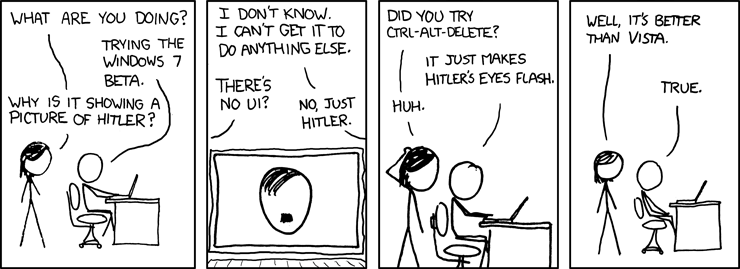
Speaking of Vista, xkcd just weighed in:
 Anyhow a dual core CPU, surprisingly low energy consumption, a GB of RAM, and 160GB of hard drive space for under $500. This is good.
Anyhow a dual core CPU, surprisingly low energy consumption, a GB of RAM, and 160GB of hard drive space for under $500. This is good.


Thursday, December 18, 2008
Long-, Short-, and Term-Term Memory
Much has been written about short and long term memory, but nothing I'm aware of about term-term memory, that phenomenon by which students, by the beginning of a semester, have forgotten everything learnt in the preceding semester. If anyone can point me to any references, I'd be obliged.
Sunday, November 16, 2008
Kudos to XOHM's Treatment of the DNS
I'm not sure how long this will last with every corporation throwing ethics to the wind in order to wring every penny out of every customer, but XOHM isn't messing with the DNS. I previously mentioned my displeasure with CavTel's redirecting DNS lookup failures from the web browser to itemnotfound.com. XOHM's allowing the DNS to work as designed.
My Last Mile
This fall I've made major changes to the wires running into my house and thought I'd take a minute to discuss Internet provider options in suburban Baltimore.
Right now I'm using XOHM 802.16 (WiMAX) service at home. I get good performance--better than my prior DSL--and the price is good. In a money-saving move, I no longer have a land line, so I had to ask Credo to boost my anytime minutes (now 450/month) and shift the beginning of my off-peak minutes from 9pm weeknights to 7pm.
To quote David Byrne, "well, how did I get here?" I moved to Baltimore County in 2005. At the time, it seemed natural to go with Verizon for phone and DSL. I already had a Verizon cell phone. I chose Working Assets (now Credo) for long distance service. The Verizon DSL was poor from day one. I spent a lot of time on the phone with Verizon technical support that year, including much time on hold, with their IVR, and with actual support personnel. Their IVR said my line checked out fine, so it seemed the obvious thing to do would be to swap out my DSL modem or check theirs at the CO. I couldn't get them to take that simple step or to send a tech out to diagnose the problem. The DSL was so bad that I often dialed in to UMBC's 56kb/s modem bank (which I think is now gone). The land line service was exceptionally poor as well, very noisy.
In the meantime, Verizon was unable to combine my land line and cell bills. They kept touting "one bill," telling me that they'd take care of it, and then a few weeks later I'd get a letter explaining that the bills couldn't be combined, with no explanation. Then I'd talk to customer service, a friendly rep would assure me she'd take care of it, and a few weeks later I'd get the same letter once again. I went through three iterations of this. I suspect the problem was that the cell phone had a Frederick, MD number, and Frederick's a couple counties over.
When my year with Verizon was up, I switched to CavTel for land line and DSL and Credo for cellular. CavTel uses Verizon's network, but charges customers less and has much better customer service. Credo uses Sprint's network, as of 2005 charged customers less, and has very good customer service. The CavTel DSL did not work--they use Verizon's lines, after all. But, after a call to CavTel customer service, a Verizon truck showed up in the alley behind my place, the line was fixed, and DSL worked reliably the rest of the time I was a CavTel customer. When they fixed the DSL, the noise on the land line cleared up as well. I was a happy CavTel customer, but paying $80 monthly for Internet and phone.
Enter Comcast, claiming $62 monthly Internet and phone. I'd heard bad things about Comcast's customer service and network reliability, but I decided to give them a shot. Note: this was about when XOHM started offering service in the area, and I think Comcast's lower prices are the result of competition, something that Comcast and Verizon don't have much of a history of. The Comcast tech came, did the install, and I was happy. The service was fast.
I wasn't happy for long, though. The Comcast Internet service worked for about 4 hours. I talked to technical support and they said it was a database problem that would be fixed in 24-72 hours. 72 hours later, still no Internet service. In the meantime, I noticed that the Comcast phone was noisy (not as bad as Verizon had been) and every time I picked the handset up, I got the staccato dial tone, indicating voice mail present. But there usually wasn't voice mail. So if they don't know how to install service and they can't fix what they claimed was a simple database problem, I don't want anything to do with them.
So I decided to disconnect Comcast service. A funny thing about disconnecting: when I went through their IVR and selected reduce or disconnect service, it put me on hold. I had stuff to do, so I hung up and dialed back in, but this time I selected add features. They picked up right away, and the woman I got was able to schedule the disconnect. But she said it would take about a week and a half. The next day I called back for a clarification of where I had to drop off their cable modem, and was told the billing would stop as soon as I returned the modem. It didn't but their customer service says they've taken care of it. Hope so.
So everything about Comcast, and everything about Verizon in Baltimore County, was negative. I'd been okay with Verizon in the past, but hadn't really needed their technical support before, so maybe I'd just been lucky. So, no land line and no Internet service. What's a guy to do? The most economical approach appeared to be upgrading my cell plan with Credo and going with XOHM, $25/month now, going up to $35/month later. I decided to give this a try.
I'm happy with XOHM. I'm at the edge of their service area, which concerned me a bit, but I am getting around 2-4Mb/s consistently. My first XOHM modem/router stopped connecting to the network several days after starting the service, but the second tech support guy I talked to said "Your modem's acting weird. Take it back to where you got it and exchange it." This was NTI Wireless, a friendly little shop pretty close to my house. I exchanged the modem, and everything's been fine since. About XOHM customer service: this is Sprint, and one of the reasons I like Credo is that they isolate me from Sprint customer service. CavTel and Credo have the tremendous advantage of being larger customers than I am, and so have some voice with the actual network provider. So, XOHM is Sprint. Sprint has a very large investment in XOHM, and they're not making money off it yet. But they're rolling it out to other cities now, apparently DC and Annapolis recently. They need to make it work, and this isn't a great time to hunt down new customers. Anyhow, their tech support people seem inexperienced--XOHM is a new service, after all--but the wait times are short and they sound like they might really be in the Kansas City area as opposed to overseas.
As a loose end, part of why I was willing to go without a land line is that my current cell phone gets pretty good reception at my house. It's a Samsung m300, and really not a good phone (I've reviewed it at Amazon). But it's an upgrade over an Audiovox phone I had, much better than an LG piece-of-junk that I shipped back to Credo, and not really as good as the old Samsung phone I used with Verizon from '02-'06.
To quote David Byrne, "well, how did I get here?" I moved to Baltimore County in 2005. At the time, it seemed natural to go with Verizon for phone and DSL. I already had a Verizon cell phone. I chose Working Assets (now Credo) for long distance service. The Verizon DSL was poor from day one. I spent a lot of time on the phone with Verizon technical support that year, including much time on hold, with their IVR, and with actual support personnel. Their IVR said my line checked out fine, so it seemed the obvious thing to do would be to swap out my DSL modem or check theirs at the CO. I couldn't get them to take that simple step or to send a tech out to diagnose the problem. The DSL was so bad that I often dialed in to UMBC's 56kb/s modem bank (which I think is now gone). The land line service was exceptionally poor as well, very noisy.
In the meantime, Verizon was unable to combine my land line and cell bills. They kept touting "one bill," telling me that they'd take care of it, and then a few weeks later I'd get a letter explaining that the bills couldn't be combined, with no explanation. Then I'd talk to customer service, a friendly rep would assure me she'd take care of it, and a few weeks later I'd get the same letter once again. I went through three iterations of this. I suspect the problem was that the cell phone had a Frederick, MD number, and Frederick's a couple counties over.
When my year with Verizon was up, I switched to CavTel for land line and DSL and Credo for cellular. CavTel uses Verizon's network, but charges customers less and has much better customer service. Credo uses Sprint's network, as of 2005 charged customers less, and has very good customer service. The CavTel DSL did not work--they use Verizon's lines, after all. But, after a call to CavTel customer service, a Verizon truck showed up in the alley behind my place, the line was fixed, and DSL worked reliably the rest of the time I was a CavTel customer. When they fixed the DSL, the noise on the land line cleared up as well. I was a happy CavTel customer, but paying $80 monthly for Internet and phone.
Enter Comcast, claiming $62 monthly Internet and phone. I'd heard bad things about Comcast's customer service and network reliability, but I decided to give them a shot. Note: this was about when XOHM started offering service in the area, and I think Comcast's lower prices are the result of competition, something that Comcast and Verizon don't have much of a history of. The Comcast tech came, did the install, and I was happy. The service was fast.
I wasn't happy for long, though. The Comcast Internet service worked for about 4 hours. I talked to technical support and they said it was a database problem that would be fixed in 24-72 hours. 72 hours later, still no Internet service. In the meantime, I noticed that the Comcast phone was noisy (not as bad as Verizon had been) and every time I picked the handset up, I got the staccato dial tone, indicating voice mail present. But there usually wasn't voice mail. So if they don't know how to install service and they can't fix what they claimed was a simple database problem, I don't want anything to do with them.
So I decided to disconnect Comcast service. A funny thing about disconnecting: when I went through their IVR and selected reduce or disconnect service, it put me on hold. I had stuff to do, so I hung up and dialed back in, but this time I selected add features. They picked up right away, and the woman I got was able to schedule the disconnect. But she said it would take about a week and a half. The next day I called back for a clarification of where I had to drop off their cable modem, and was told the billing would stop as soon as I returned the modem. It didn't but their customer service says they've taken care of it. Hope so.
So everything about Comcast, and everything about Verizon in Baltimore County, was negative. I'd been okay with Verizon in the past, but hadn't really needed their technical support before, so maybe I'd just been lucky.
So, no land line and no Internet service. What's a guy to do? The most economical approach appeared to be upgrading my cell plan with Credo and going with XOHM, $25/month now, going up to $35/month later. I decided to give this a try.I'm happy with XOHM. I'm at the edge of their service area, which concerned me a bit, but I am getting around 2-4Mb/s consistently. My first XOHM modem/router stopped connecting to the network several days after starting the service, but the second tech support guy I talked to said "Your modem's acting weird. Take it back to where you got it and exchange it." This was NTI Wireless, a friendly little shop pretty close to my house. I exchanged the modem, and everything's been fine since. About XOHM customer service: this is Sprint, and one of the reasons I like Credo is that they isolate me from Sprint customer service. CavTel and Credo have the tremendous advantage of being larger customers than I am, and so have some voice with the actual network provider. So, XOHM is Sprint. Sprint has a very large investment in XOHM, and they're not making money off it yet. But they're rolling it out to other cities now, apparently DC and Annapolis recently. They need to make it work, and this isn't a great time to hunt down new customers. Anyhow, their tech support people seem inexperienced--XOHM is a new service, after all--but the wait times are short and they sound like they might really be in the Kansas City area as opposed to overseas.
As a loose end, part of why I was willing to go without a land line is that my current cell phone gets pretty good reception at my house. It's a Samsung m300, and really not a good phone (I've reviewed it at Amazon). But it's an upgrade over an Audiovox phone I had, much better than an LG piece-of-junk that I shipped back to Credo, and not really as good as the old Samsung phone I used with Verizon from '02-'06.
Wednesday, September 24, 2008
Mikulski on Paulson's Cash for Trash
Promising text from an e-mail I received from Sen. Mikulski's office this afternoon: "Congress must act promptly to restore confidence and stability in the economy. But I will not be stampeded into voting for the Bush Administration bill. During the last seven years, every time there's a crisis, they generate fear and they generate bad ideas. This three-page bill gives the Secretary of the Treasury unlimited power to intervene in our financial markets without any review by Congress, agencies, or courts. It cannot be rubber stamped by the Congress."
$700G Bailout
Secretary Hank Paulson's Cash for Trash Scheme.
- From Tom Schaller, political science professor at UMBC, a Baltimore Sun editorial on liberal vs. conservative takes on government assistance, socialism, etc.
- Lauren Weinstein's take on the mess.
- From the Daily Kos: The Biggest Heist in World History
Tuesday, September 2, 2008
GNU Emacs: making the obvious difficult
Off and on it's really irritated me that someone on the GNU team decided to change the default behavior of tab in fundamental mode from insert ^i to indent-relative. I hate indent-relative. It makes lining things up in columns in text files difficult. So every few months I do a Google search, find other people making the same complaint, and see less than helpful suggestions. Tonight I got more frustrated than usual, and so spent more time than usual. It appears that the following shuts off indent-relative for the most part without messing up filename completion or indentation in various modes, e.g., java or html.
(setq default-major-mode 'text-mode)
(define-key text-mode-map "\t" "\C-q\C-i")
The above is pretty much alpha code at the moment. There's detritus in my .emacs that suggests that years ago I didn't like text mode for pnews or mail modes, but those are no longer issues. indent-relative is, IMHO, evidence of word processor-oriented thought processes, not text editor-oriented processes. As Linux grows to be more Windows like (e.g., bloated and buggy), there seems to be an undercurrent of making basic tools, e.g., emacs and wc, less Unix-like.
Tuesday, August 26, 2008
Installing Apache on Ubuntu
Addison Berry provides a very nice video walking the viewer through the installation of Apache/PHP/MySQL on Ubuntu: http://www.lullabot.com/videocast/install-local-web-server-ubuntu
Wednesday, August 20, 2008
Security Profiteering
Reducing the chances that we'll ever get away from security screenings is the new view of the security checkpoint as a profit center. Airports, and now football stadiums have security checkpoints, long lines, and now faster, low-security lines available to customers willing to pay. This may be less objectionable in a stadium than in an airport, since stadiums have more room for more checkpoints, but it still seems to be primarily a way to profit off security theater.
First of all, what reason do we have to believe that the background checks of those willing to pay the fees are actually effective? Second, in an airport, there is limited space for security checkpoints, so adding express lanes reduces the space for other security lanes, so people willing to pay for the low security line slow the rest of us down. Finally, a new segment in the security theater industry creates a new group lobbying against change. Once these fees are in place, and being funneled to "entrepreneurs" profiting from them, there will be lobbyists fighting any attempt to do away with these trusted traveler/fan programs. And we'll have another example of congress following the money rather than listening to the citizenry--who, BTW, don't seem to care enough to stay informed or to vote.
The odds of being killed by a terrorist is nearly zero, but the probability of being inconvenienced by, losing privacy and liberty to, and footing the bill for security theater is 1.
Friday, August 15, 2008
Thursday, August 14, 2008
If I Had a Hammer...
I have my new RFID passport. I considered whacking it with a hammer and hoping that would kill the RFID chip. A lot of people are doing this, or at least talking about it. Instead I've gotten a new passport holder that doubles as a credit card holder and a Faraday cage. Now I feel better with the not easily testable assertion that when the passport's closed, it can't be read. Apparently the chip's easily read if the passport is open just a bit, and not so easy if it's closed. The Faraday cage adds a layer of security.
Using a Faraday cage rather than a hammer has the added benefit of not being illegal. The US government says it's illegal to try to maintain just a little privacy. Soon we'll have Real ID with RFID chips, and the game will be over, game set match to the shadowy overlords.
I really should get and play around with an RFID reader.
Gnome Caps Lock, Insert Keys
Some time back I discussed disabling the caps lock and insert keys in gnome. In Hardy Heron (Ubuntu 8.04) the caps lock suggestion I made stopped functioning. Here's the new fix:
#! /bin/sh
# Kills the stoopid caps lock and insert keys.

file=/tmp/capsLockDisabled

if test ! -e $file ; then
        /usr/bin/xmodmap -e "keycode 66 = "
        /usr/bin/xmodmap -e "keycode 106 = "
        /bin/date >$file
fi
I'm still amazed every time a new release of Gnome comes out and they still don't give the user a way of getting rid of these. As a system staffer in the Ohio State CIS department (Frank Adelstein? Frodo?) once said: "The caps lock key shouldn't be right next to keys that are used all the time. It should be somewhere off in the next room." Ok, that was a paraphrase, not really a quote, and I don't remember who I'm paraphrasing.
Anyhow, the above script does it. I call the script from my .cshrc. Those of you who use bash (yuck) would put it in your .profile.
Evince Bug Workaround
Evince has been a continuous battle for me ever since I switched from KDE to Gnome. Ok, more of an occasional annoyance than a continuous battle, and the various problems I've had with Evince convinced me to install and primarily use kpdf for awhile. Well, I've got a fresh Ubuntu install, and didn't want to litter it with all the junk that comes along with kpdf, so I've been using evince. However, evince wants to print everything in A4 format. Yes, my printer defaults are letter. Yes, the PDF documents are letter size. Yes, /etc/papersize contains one line, letter.
I remember wasting an afternoon on this sometime back, so the question became tell evince to use letter every single time I print, go back to kpdf, or waste another afternoon with no guarantee of better results than last time.
First tried the obvious thing:
Totally useless. Instead of placing everything in one place, the evince folks have decided to scatter documentation all over the place at their web site. But, unlike last time, Google found me a solution, a recent blog entry by Dominique Cimafranca at UbuntuLiving. He apparently uses bash, and so suggests a change to the user's .profile. I use tcsh, and so added this line to my .cshrc:
UbuntuLiving suggests that after making this change, one log out and then back in. Not necessary. Any new xterm opened from that point will have the correct setting, or one can just type
in an existing xterm (or gnome-terminal, or konsole, or whatever) and LC_PAPER is set. Then the next time you type the evince command, it'll actually print correctly with no gyrations by the user. Imagine that.
Is this a bug within evince? The evince folks may think not, but Google is unable to find any mention of LC_PAPER at site:www.gnome.org/projects/evince/ and the man page is useless, so the documentation is woefully lacking. Yeah, I'm using an undocumented feature. It'll probably break with the next release.
I remember wasting an afternoon on this sometime back, so the question became tell evince to use letter every single time I print, go back to kpdf, or waste another afternoon with no guarantee of better results than last time.
First tried the obvious thing:
man evince
Totally useless. Instead of placing everything in one place, the evince folks have decided to scatter documentation all over the place at their web site. But, unlike last time, Google found me a solution, a recent blog entry by Dominique Cimafranca at UbuntuLiving. He apparently uses bash, and so suggests a change to the user's .profile. I use tcsh, and so added this line to my .cshrc:
setenv LC_PAPER en_US.UTF-8@letter
UbuntuLiving suggests that after making this change, one log out and then back in. Not necessary. Any new xterm opened from that point will have the correct setting, or one can just type
source ~/.cshrc
in an existing xterm (or gnome-terminal, or konsole, or whatever) and LC_PAPER is set. Then the next time you type the evince command, it'll actually print correctly with no gyrations by the user. Imagine that.
Is this a bug within evince? The evince folks may think not, but Google is unable to find any mention of LC_PAPER at site:www.gnome.org/projects/evince/ and the man page is useless, so the documentation is woefully lacking. Yeah, I'm using an undocumented feature. It'll probably break with the next release.
Saturday, July 26, 2008
Gnome's Messed-Up GLSlideshow
For some inexplicable reason, in Ubuntu 8.04, the screen saver GLSlideshow has no configuration options. There's a long discussion of this issue in the Ubuntu Forums, suggesting that a lot of people have found this perplexing. I think the best how-to on managing GLSlideshow is provided by Bits 'n Pieces.
Friday, July 18, 2008
Mark Berg Climbs Kilimanjaro
First, the Boston Herald article
The NHL has a day-by-day log of the trip:
The NHL has a day-by-day log of the trip:
[ Added 2011-12-30: the NHL seems to have deleted the day-by-day log, but they have a video, likely shot by Mark, at http://video.nhl.com/videocenter/console?id=22732 ]
Subscribe to:
Posts (Atom)