Tuesday, May 19, 2009
Thew and Fro
Spell checkers allow users to add words to their dictionaries. It would be nice if they would also allow users to subtract words. Two frequent typos of mine are 'thew' for 'the' and 'fro' for 'for'. Unfortunately, both typos are English words, though neither is a word I use at all often. Almost always when either occurs in my writing it's a typo. So why can't I tell ispell or Open Office or Firefox or Thunderbird that these are words that should be flagged as misspellings?
Actually, I could write a postprocessor for LaTeX documents that flags likely typos, but it would be harder to do this for a clumsier tool, like the WYSIWYG tools. Also this points out a problem with non-text-based tools for text-based applications. A postprocessor would work fine for text files, which means it would be more widely applicable than to just LaTeX, but every GUI has its own spell checker, with its own dictionary, and so they don't integrate well with each other, with simple tools, etc.
Going back to elm or mutt for e-mail would solve part of this problem, by raising my productivity for basic e-mail by allowing the editing of e-mail in emacs, but they make multimedia e-mail a bit more of a challenge. OTOH, perhaps they've improved attachment handling in the past few years--worth a look.


Sunday, May 17, 2009
American Film Institute Member Benefits
I belong to the AFI, and like being a member. The AFI Silver, in Silver Spring, MD, is perhaps the best place in the Washington/Baltimore area to see a film. However, one annoying thing keeps cropping up, and more, it seems, this year than in the past.
When a member renews, the AFI sends a few member passes for free admission to a show. The problem is every time, or so it seems, that I try to use one of these free passes, I'm told passes are not being accepted for this particular show. Last night I couldn't use a member pass to see "Limits of Control." The theatre was not remotely close to full. What's the problem? Why do they bother to give member benefits that cannot be used?
In '07 and '08 I don't recall this problem cropping up nearly as frequently. Something's changed in the theatre management, and not for the better.
When a member renews, the AFI sends a few member passes for free admission to a show. The problem is every time, or so it seems, that I try to use one of these free passes, I'm told passes are not being accepted for this particular show. Last night I couldn't use a member pass to see "Limits of Control." The theatre was not remotely close to full. What's the problem? Why do they bother to give member benefits that cannot be used?
In '07 and '08 I don't recall this problem cropping up nearly as frequently. Something's changed in the theatre management, and not for the better.
Saturday, May 16, 2009
LaTeX Blog
Looking for advice on including source code within a LaTeX document, I stumbled across a wonderful, though not terribly active, blog on LaTeX. It's been 7 months since the last post, but there's a lot of useful information there. The URL: http://texblog.wordpress.com/
Wednesday, April 8, 2009
Version Pi
Is this cool (in a geeky sort of way) or what?
> latex 450mw-t2
This is pdfTeXk, Version 3.141592-1.40.3 (Web2C 7.5.6)
%&-line parsing enabled.
entering extended mode
(./450mw-t2.tex
LaTeX2e <2005/12/01>
Saturday, March 28, 2009

Tuesday, March 24, 2009
Throughput from Amazon
I just downloaded an MP3 album and a couple MP3 tracks from another album from Amazon. With the first album, download speeds were about 500kB/s (over 4Mb/s). For the other two tracks, the download speed dropped to under 200kB/s. How come? I noticed it, but didn't give it much thought until receiving the e-mail confirmation from Amazon, and then it was clear. Amazon Digital Services was the seller of the album, and Sony BMG was the seller of the other tracks. They were coming from another server, one which was slower, at least in terms of the bandwidth it was able to give me at the time.
Monday, March 2, 2009
Identity & Authentication Must be Kept Separate
In a recent newsletter, Bruce Schneier referred to an article at Microsoft TechNet by Steve Riley, a Senior Security Strategist. The article is pretty good overall, and certainly worth reading. It's also short, so I won't bother to summarize it here. Instead, I'll just make a few comments:
- The point that basic computer science principles cannot be glossed over is quite welcome.
- The statement that the system knows the password is usually, one would hope, incorrect. If passwords are kept anywhere in the system, that file becomes a high-value target. Passwords should have salt shaken on them and then be hashed. The salted hash can be safely stored, and used to verify the user's password.
- Other examples of authentication with no corresponding identity include boot passwords and disk encryption pass phrases.
- I'm happy to see anyone make the point, which Riley makes here, that biometrics are best viewed as identity, not as authentication. Biometrics are (typically) public and irrevocable, which make them bad choices for authentication.
Monday, February 23, 2009
Blackboard Security, UMBC
A couple items that instructors using Blackboard at UMBC should be aware of:
First, at the beginning of most sessions when one is preparing to post new content, a requester pops up asking for permission to run a Java application. The correct answer is, emphatically, no. Everything works fine if you deny that application permission to run, so there's no need to grant it complete and total access to your PC (or to your account on the PC which, for most Windows users, is the same as the PC itself).
Second, OIT often refers to Blackboard as a secure place to post grades. In some respects this is true. However, be aware that the grades are transfered in the clear, so anyone eavesdropping can see all the grades of everyone in your class. On campus this is probably a minimal problem for wired users. It's a switched Ethernet, and hard to eavesdrop on. The campus wireless is not encrypted however, so accessing a Blackboard grade book using 802.11 on campus is not secure. By the same token, accessing a blackboard grade book from off campus is not secure.
Sleep
I'm clearly not getting enough sleep if two consecutive posts contain as much overlap as the last two without me noticing until after the fact. As Vonnegut might've said, so it goes.
Improving the Usability of myUMBC
myUMBC has become, in the words of one of our students, very media heavy. Even with a broadband connection, it takes a long time for things to load, presumably due to load on the servers and perhaps scripting locally. One of the annoying things is a rotating banner of supposed news items. I've chosen not to do anything about that yet. Two things I have disabled, however, using Firefox add-on Karma Blocker, are:
The chipmunk animation that loads whenever a page is not found. This is doubly bad, since it's not only many useless bytes transferred, but it also makes noise. This is triply bad, because the 404 not found chipmunk normally occurs after clicking a bad link in myUMBC. Karma Blocker rule:
# Block myUMBC 404 not found chipmunk
[group]
score=10
rule=$url$='dramatic_chipmunk.flv'
For those who want to see the animation, the full URL is https://my.umbc.edu/shared/images/player/player.swf?vidLoc=/errors/images/dramatic_chipmunk.flv The second thing is the MyUMBC alert "feature." There is good reason to have such features, but when it's used to tell people not to respond to phishing attacks and to tell people after the fact that the University opened late that morning, it's not clear it's useful. But it also takes several clicks to dismiss the alert, and until dismissed there's this huge honking red thing in a prominent position on the screen. The solution is to get rid of the red thing. The alert is presented as a white number on a red background. Get rid of the background, and it bcomes a white number on a white background. Much better. Karma Blocker rule:
# Block UMBC Alerts
#[group]
#score=10
#rule=$url=='https://my.umbc.edu/modules/dashboard/images/alert_bubble.png'
Monday, February 2, 2009
Disabling Alerts in myUMBC
UMBC's OIT has added an Alerts feature to myUMBC, the system everyone uses for everything at UMBC. Being close to people who were in Norris Hall during the Virginia Tech shootings, I understand the motivation and think that, on the face of things, the alerts are a good idea.
However, they're being used for mundane matters--Wednesday around 11am I saw the alert that said campus was closed that morning until 10--and very cumbersome to dismiss. You have to click on the alert notification, click on the specific alert, and then click on something indicating that you've seen the alert. They really want to know we've seen every alert. Unfortunately, myUMBC is very media heavy, and, even from on campus, very slow. So each click takes several seconds.
So I looked on myUMBC for an option to disable alerts, or some way to dismiss them more quickly. No luck. NoScript (my favorite Firefox add-on) didn't help, since the alerts aren't implemented as a specific script. So I went hunting.
The hunt led to Karma Blocker 0.3.2. Essentially I tell this nifty little Firefox add-on that the myUMBC alert has bad karma, and so it keeps the alert from loading.
What it really does is get rid of the red alert background, which means my count of alerts awaiting is a white number on a white background. The rule I use is:
# Block UMBC Alerts
[group]
score=10
rule=$url=='https://my.umbc.edu/modules/dashboard/images/alert_bubble.png'
OIT could easily break this by renaming or moving the image file. I'm hoping they don't. If they do, I can make the rule more general.
Friday, January 9, 2009
A Milestone of Sorts
It used to be whenever I bought a new computer, I went into it thinking it'd run around $2k. My Kaypro 4-84+88 was $2k in 1984, my Amiga was $1500 or so in '86 or '87, but came in around $2k with accessories (RAM, 5.25" floppy, etc.). I bought a few PCs from the '90s to a couple years ago that were all in the $2k ballpark. Of course, each one was far more powerful than the one before. Lately when I've priced desktops it's become clear that $2k is now excessive for my needs, or at least as long as I'm not running Vista.
I've also bought laptops (kinda in the Kaypro spirit), and the constant was that a laptop would be noticeably more expensive than a comparable desktop. This doesn't seem true anymore.
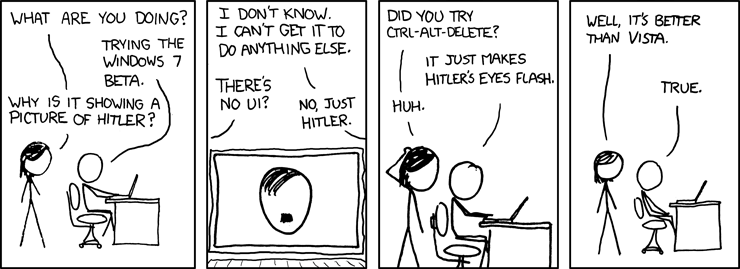
I just bought a Samsung NC10 Netbook, $480 from Amazon. This is a sweet little machine, weighing under 3 pounds and having long battery life (I haven't quite figured out how long, yet). It does come loaded with useless junk, but not as much as my Dell laptop did. And it came with XP, so I've still managed to completely avoid Vista.
Speaking of Vista, xkcd just weighed in:
 Anyhow a dual core CPU, surprisingly low energy consumption, a GB of RAM, and 160GB of hard drive space for under $500. This is good.
 Anyhow a dual core CPU, surprisingly low energy consumption, a GB of RAM, and 160GB of hard drive space for under $500. This is good.
Thursday, December 18, 2008
Long-, Short-, and Term-Term Memory
Much has been written about short and long term memory, but nothing I'm aware of about term-term memory, that phenomenon by which students, by the beginning of a semester, have forgotten everything learnt in the preceding semester. If anyone can point me to any references, I'd be obliged.
Sunday, November 16, 2008
Kudos to XOHM's Treatment of the DNS
I'm not sure how long this will last with every corporation throwing ethics to the wind in order to wring every penny out of every customer, but XOHM isn't messing with the DNS. I previously mentioned my displeasure with CavTel's redirecting DNS lookup failures from the web browser to itemnotfound.com. XOHM's allowing the DNS to work as designed.
My Last Mile
This fall I've made major changes to the wires running into my house and thought I'd take a minute to discuss Internet provider options in suburban Baltimore.
Right now I'm using XOHM 802.16 (WiMAX) service at home. I get good performance--better than my prior DSL--and the price is good. In a money-saving move, I no longer have a land line, so I had to ask Credo to boost my anytime minutes (now 450/month) and shift the beginning of my off-peak minutes from 9pm weeknights to 7pm.
To quote David Byrne, "well, how did I get here?" I moved to Baltimore County in 2005. At the time, it seemed natural to go with Verizon for phone and DSL. I already had a Verizon cell phone. I chose Working Assets (now Credo) for long distance service. The Verizon DSL was poor from day one. I spent a lot of time on the phone with Verizon technical support that year, including much time on hold, with their IVR, and with actual support personnel. Their IVR said my line checked out fine, so it seemed the obvious thing to do would be to swap out my DSL modem or check theirs at the CO. I couldn't get them to take that simple step or to send a tech out to diagnose the problem. The DSL was so bad that I often dialed in to UMBC's 56kb/s modem bank (which I think is now gone). The land line service was exceptionally poor as well, very noisy.
In the meantime, Verizon was unable to combine my land line and cell bills. They kept touting "one bill," telling me that they'd take care of it, and then a few weeks later I'd get a letter explaining that the bills couldn't be combined, with no explanation. Then I'd talk to customer service, a friendly rep would assure me she'd take care of it, and a few weeks later I'd get the same letter once again. I went through three iterations of this. I suspect the problem was that the cell phone had a Frederick, MD number, and Frederick's a couple counties over.
When my year with Verizon was up, I switched to CavTel for land line and DSL and Credo for cellular. CavTel uses Verizon's network, but charges customers less and has much better customer service. Credo uses Sprint's network, as of 2005 charged customers less, and has very good customer service. The CavTel DSL did not work--they use Verizon's lines, after all. But, after a call to CavTel customer service, a Verizon truck showed up in the alley behind my place, the line was fixed, and DSL worked reliably the rest of the time I was a CavTel customer. When they fixed the DSL, the noise on the land line cleared up as well. I was a happy CavTel customer, but paying $80 monthly for Internet and phone.
Enter Comcast, claiming $62 monthly Internet and phone. I'd heard bad things about Comcast's customer service and network reliability, but I decided to give them a shot. Note: this was about when XOHM started offering service in the area, and I think Comcast's lower prices are the result of competition, something that Comcast and Verizon don't have much of a history of. The Comcast tech came, did the install, and I was happy. The service was fast.
I wasn't happy for long, though. The Comcast Internet service worked for about 4 hours. I talked to technical support and they said it was a database problem that would be fixed in 24-72 hours. 72 hours later, still no Internet service. In the meantime, I noticed that the Comcast phone was noisy (not as bad as Verizon had been) and every time I picked the handset up, I got the staccato dial tone, indicating voice mail present. But there usually wasn't voice mail. So if they don't know how to install service and they can't fix what they claimed was a simple database problem, I don't want anything to do with them.
So I decided to disconnect Comcast service. A funny thing about disconnecting: when I went through their IVR and selected reduce or disconnect service, it put me on hold. I had stuff to do, so I hung up and dialed back in, but this time I selected add features. They picked up right away, and the woman I got was able to schedule the disconnect. But she said it would take about a week and a half. The next day I called back for a clarification of where I had to drop off their cable modem, and was told the billing would stop as soon as I returned the modem. It didn't but their customer service says they've taken care of it. Hope so.
So everything about Comcast, and everything about Verizon in Baltimore County, was negative. I'd been okay with Verizon in the past, but hadn't really needed their technical support before, so maybe I'd just been lucky. So, no land line and no Internet service. What's a guy to do? The most economical approach appeared to be upgrading my cell plan with Credo and going with XOHM, $25/month now, going up to $35/month later. I decided to give this a try.
I'm happy with XOHM. I'm at the edge of their service area, which concerned me a bit, but I am getting around 2-4Mb/s consistently. My first XOHM modem/router stopped connecting to the network several days after starting the service, but the second tech support guy I talked to said "Your modem's acting weird. Take it back to where you got it and exchange it." This was NTI Wireless, a friendly little shop pretty close to my house. I exchanged the modem, and everything's been fine since. About XOHM customer service: this is Sprint, and one of the reasons I like Credo is that they isolate me from Sprint customer service. CavTel and Credo have the tremendous advantage of being larger customers than I am, and so have some voice with the actual network provider. So, XOHM is Sprint. Sprint has a very large investment in XOHM, and they're not making money off it yet. But they're rolling it out to other cities now, apparently DC and Annapolis recently. They need to make it work, and this isn't a great time to hunt down new customers. Anyhow, their tech support people seem inexperienced--XOHM is a new service, after all--but the wait times are short and they sound like they might really be in the Kansas City area as opposed to overseas.
As a loose end, part of why I was willing to go without a land line is that my current cell phone gets pretty good reception at my house. It's a Samsung m300, and really not a good phone (I've reviewed it at Amazon). But it's an upgrade over an Audiovox phone I had, much better than an LG piece-of-junk that I shipped back to Credo, and not really as good as the old Samsung phone I used with Verizon from '02-'06.
To quote David Byrne, "well, how did I get here?" I moved to Baltimore County in 2005. At the time, it seemed natural to go with Verizon for phone and DSL. I already had a Verizon cell phone. I chose Working Assets (now Credo) for long distance service. The Verizon DSL was poor from day one. I spent a lot of time on the phone with Verizon technical support that year, including much time on hold, with their IVR, and with actual support personnel. Their IVR said my line checked out fine, so it seemed the obvious thing to do would be to swap out my DSL modem or check theirs at the CO. I couldn't get them to take that simple step or to send a tech out to diagnose the problem. The DSL was so bad that I often dialed in to UMBC's 56kb/s modem bank (which I think is now gone). The land line service was exceptionally poor as well, very noisy.
In the meantime, Verizon was unable to combine my land line and cell bills. They kept touting "one bill," telling me that they'd take care of it, and then a few weeks later I'd get a letter explaining that the bills couldn't be combined, with no explanation. Then I'd talk to customer service, a friendly rep would assure me she'd take care of it, and a few weeks later I'd get the same letter once again. I went through three iterations of this. I suspect the problem was that the cell phone had a Frederick, MD number, and Frederick's a couple counties over.
When my year with Verizon was up, I switched to CavTel for land line and DSL and Credo for cellular. CavTel uses Verizon's network, but charges customers less and has much better customer service. Credo uses Sprint's network, as of 2005 charged customers less, and has very good customer service. The CavTel DSL did not work--they use Verizon's lines, after all. But, after a call to CavTel customer service, a Verizon truck showed up in the alley behind my place, the line was fixed, and DSL worked reliably the rest of the time I was a CavTel customer. When they fixed the DSL, the noise on the land line cleared up as well. I was a happy CavTel customer, but paying $80 monthly for Internet and phone.
Enter Comcast, claiming $62 monthly Internet and phone. I'd heard bad things about Comcast's customer service and network reliability, but I decided to give them a shot. Note: this was about when XOHM started offering service in the area, and I think Comcast's lower prices are the result of competition, something that Comcast and Verizon don't have much of a history of. The Comcast tech came, did the install, and I was happy. The service was fast.
I wasn't happy for long, though. The Comcast Internet service worked for about 4 hours. I talked to technical support and they said it was a database problem that would be fixed in 24-72 hours. 72 hours later, still no Internet service. In the meantime, I noticed that the Comcast phone was noisy (not as bad as Verizon had been) and every time I picked the handset up, I got the staccato dial tone, indicating voice mail present. But there usually wasn't voice mail. So if they don't know how to install service and they can't fix what they claimed was a simple database problem, I don't want anything to do with them.
So I decided to disconnect Comcast service. A funny thing about disconnecting: when I went through their IVR and selected reduce or disconnect service, it put me on hold. I had stuff to do, so I hung up and dialed back in, but this time I selected add features. They picked up right away, and the woman I got was able to schedule the disconnect. But she said it would take about a week and a half. The next day I called back for a clarification of where I had to drop off their cable modem, and was told the billing would stop as soon as I returned the modem. It didn't but their customer service says they've taken care of it. Hope so.
So everything about Comcast, and everything about Verizon in Baltimore County, was negative. I'd been okay with Verizon in the past, but hadn't really needed their technical support before, so maybe I'd just been lucky.
So, no land line and no Internet service. What's a guy to do? The most economical approach appeared to be upgrading my cell plan with Credo and going with XOHM, $25/month now, going up to $35/month later. I decided to give this a try.I'm happy with XOHM. I'm at the edge of their service area, which concerned me a bit, but I am getting around 2-4Mb/s consistently. My first XOHM modem/router stopped connecting to the network several days after starting the service, but the second tech support guy I talked to said "Your modem's acting weird. Take it back to where you got it and exchange it." This was NTI Wireless, a friendly little shop pretty close to my house. I exchanged the modem, and everything's been fine since. About XOHM customer service: this is Sprint, and one of the reasons I like Credo is that they isolate me from Sprint customer service. CavTel and Credo have the tremendous advantage of being larger customers than I am, and so have some voice with the actual network provider. So, XOHM is Sprint. Sprint has a very large investment in XOHM, and they're not making money off it yet. But they're rolling it out to other cities now, apparently DC and Annapolis recently. They need to make it work, and this isn't a great time to hunt down new customers. Anyhow, their tech support people seem inexperienced--XOHM is a new service, after all--but the wait times are short and they sound like they might really be in the Kansas City area as opposed to overseas.
As a loose end, part of why I was willing to go without a land line is that my current cell phone gets pretty good reception at my house. It's a Samsung m300, and really not a good phone (I've reviewed it at Amazon). But it's an upgrade over an Audiovox phone I had, much better than an LG piece-of-junk that I shipped back to Credo, and not really as good as the old Samsung phone I used with Verizon from '02-'06.
Subscribe to:
Posts (Atom)